




- Accounts
- Launcher Network
- Password Manager (though it shouldn't be used as such, at least not for your banking and stuff, but more on that later)
- Some parts of Drivers manager
- Extra hardware monitors (also thinking on the merge of Log and Net Monitor to reduce CPU strain for those who use both)
- Files manager (probably not what you think that it will be)
As v0.8 is close to the release, I've decided to start this thread, even though that most likely there will be other development threads for v0.8*.
The main goal of this thread is to collect your thoughts and ideas on Launcher Accounts. I've mentioned them coming for quite some time, here and there, but let me explain it in a more generalized way and how that will impact you.
First of all - you won't need an Account for what you currently use Launcher for, with the only possible exception of AOTP, and that was mentioned from the very beginning. I might allow AOTP for Anonymous accounts, if there will be a huge demand for it, but I don't expect to see a demand, as Account will ensure that your generated AOTPs are safer and less likely to be stolen by malicious programs, so I have no idea why would you not want to use Account for AOTP.
Accounts will not be web-based, no servers, all your Account data will remain only on your end. This also means that I will not be held responsible if you'll not keep it safe.
So what are those Accounts? The easiest way to explain will be this picture:
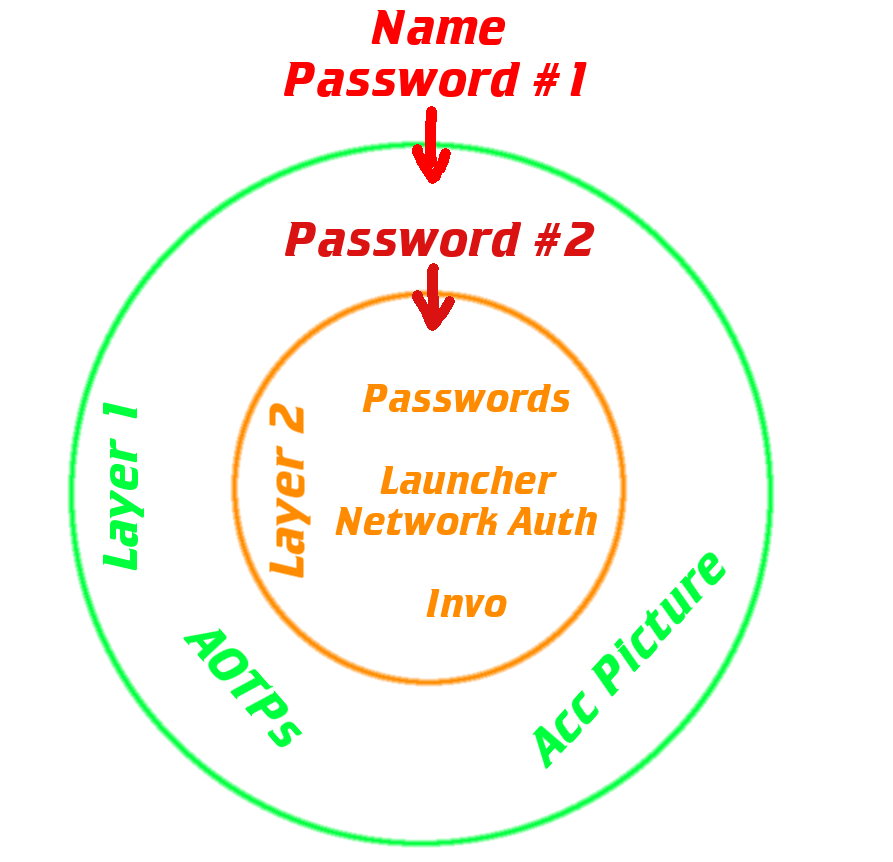
Layer 0. It is an open layer, basically a folder with all accounts on your system. Each account is a separate file named as "Acc Name", for you to differentiate them.
Layer 1. To access layer 1 you'll need to provide Launcher the name and password of your account. Actually there will be different encryption options provided, so there might be multiple passwords, or a password and a number or just password and the name will be purely for display. What is certain is that layer 1 will be encrypted as a set of files, which will be accessible at need, thus reducing the amount of required RAM and increasing the security of layer 2. At the same time layer 1 will not be as secure as layer 2, due to this encryption scheme (it's a bit complicated for explanation, so I won't go into the technical details as to why).
This layer will also have in-memory encryption of AOTPs, so they will be exposed in RAM only during the actual calculations of AOTPs.
Acc Picture is purely for displaying (avatar; planned to go in the upper-right corner of Launcher main window, right under the language selection; also will be used to access "Account Menu"). Possibly will be used in Launcher Network Messenger after the handshake.
Layer 2. Secure layer, that consists of multiple files, which you'll be able to load and offload at need, while the layer 1 is opened. To access it you'll need to provide "2nd password", actually there will be different encryption options provided as well, so there might be multiple passwords, etc. Encryption method will be different to layer 1, as it will be encrypted on per-file basis, thus you'll be able to set different passwords for each, if you'll want ofc. Basically all of the most sensitive data will go here.
I might add layer 3 for Invo, if I'll end up splitting signing and transfers, but as of now I don't plan to.
Hopefully it doesn't sound too complicated. I'll stop here for now, in order to not overload you with the info, but the main idea is out here. If you have some questions/suggestions - feel free to ask/leave them here.



 for multiple reasons, but even after all of that hard work there is still one more annoyance left - signing your working driver. Windows will refuse to load drivers, that are not signed by specific type of certificate. While that might not sound too complicated, in comparison to the development of drivers, usually you'd have a corporate certificate usable for this purpose. There are few types of such certificates, ranging from expensive with limitations all the way up to extremely expensive, that will also require you to send the updated driver, each time, including source code, to Microsoft for lengthy verification and validation process, not even mentioning the requirements for the privilege to buy one. There are few workarounds. 1st one is to enable the loading of unsigned drivers, but that will require turning off certain features, will put your system at risk and, to top it off, will most likely trigger any descent ACs, which will refuse to load under such system, requiring you to switch back and forth, which does include a reboot, and...well basically not an option for the broad userbase. 2nd one is to use "known" certificate. This approach eliminates all of the mentioned issues, but since it is "known" many AVs and ACs will flag it as /whatever (I'll provide example later in this post), regardless of the actual file content, and will be triggered. 3rd approach involved single driver, signed by 2nd approach, that will elevate permissions of all other drivers (even unsigned) to their required level and load them. To avoid detection by AVs it basically needs to load and do its work during the system load, before the AV start, and even with configured exclusion in AV it will still permanently load those drivers (until system reboot), without the ability to unload them. Good ACs will also be triggered by unsigned drivers loaded in the system, even more so than with the 2nd approach. There are few more workarounds, but they're not very suitable for the required purpose. All of the mentioned approaches have their pros and cons, so I've settled on the 2nd one, for now.
 then I'm always willing to accept one and will gladly use it instead, so that my drivers won't trigger anything on your system. Lastly, I'm looking for volunteers, willing to test detection and loading of such drivers. If there will be some volunteers willing to become a test subjects, then I'll make a small program, that will simply load/unload one driver, that won't do anything, and will be used to test how it loads in your Windows and if it triggers your AV/ACs; especially looking for a volunteer with the latest version of Windows 10. If there won't be any volunteers for such tests, then all of the aforementioned functionality will be developed based solely on my system (technically I could install gabillion of Windows versions with gabillion of AVs on VM and test it all in that way, but obviously that's not going to happen (I'm not claiming that it's not going to happen, as technically if someone will be willing to donate gabillion of $...(obviously that's not going to happen, but...
  ). Also during the "Password" input you'll be able to select compression method (no-compression option is also there), which can both reduce the size of file and increase its security. Apart of your actual Password you will also need to remember both options, as these data, deliberately, will not be stored in your account file (with few options it won't be a problem, since it will be easy to just try 'em all, but with the addition of new methods...).